
Offline field app — iOS & Android
Walk the building. Leave with the report.
FiberScan is a field app for licensed asbestos surveyors and building inspectors. Record suspected materials where you find them, photograph and annotate them, sketch the floor plan, measure the runs, log the bulk samples — then generate the register, the photograph appendix and the signed declaration as one PDF, on site, with no signal.


Free to start. No account needed to survey.
21:47
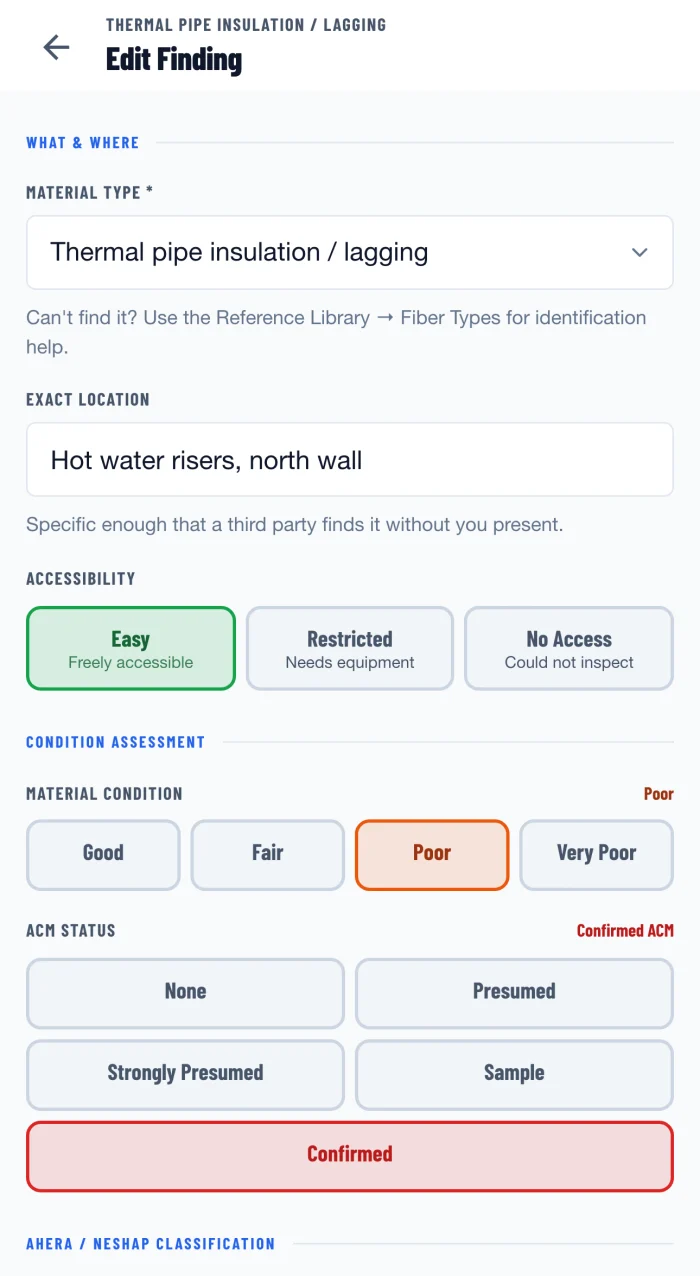
The survey happens in the building. The report happens at 21:47, in the van or at the kitchen table, from a phone full of photographs and a notebook full of shorthand — hours after the last time anyone actually looked at the material. FiberScan closes that gap by making the capture and the document the same act.
01
The pass
Six things happen in a building. All six happen in the app.
-
01
Areas
Break the building into the areas you actually walk — floors, rooms, risers, plant rooms. That structure carries through to the register and the report.
-
02
Findings
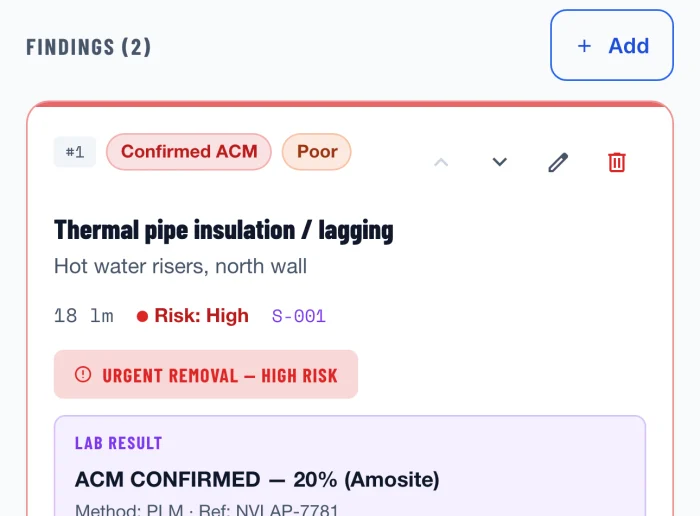
Record each suspected material where you find it: type, exact location, extent, condition, surface treatment, accessibility and friability.
-
03
Photographs
Photograph and annotate on the spot. Arrows, boxes and notes are drawn onto the image rather than filed beside it, so the appendix still explains itself six months later, to somebody who was never there. Photographs stay attached to the finding, not to a camera roll.
-
04
Measurement
Runs and areas by AR on supported devices, or typed in. Quantities carry into the register, and the report marks them indicative.
-
05
Floor plan
Sketch the level as you walk it — walls, doors, rooms, risers — and drop a pin on each finding, coloured by its risk band and numbered to match the register. The plan goes into the report as its own section, so the plan and the register can be read against each other by somebody holding only the PDF.
-
06
Samples
Log bulk samples against the finding they came from, with the laboratory, the method and the result when it comes back.
02
Assessment
The region you set changes what the app asks you.
The region you set drives the survey types you can choose, the terminology on screen, the assessment inputs you are asked for, and the headings the report prints under.
A UK survey collects the HSG264 material assessment inputs — product type, extent of damage, surface treatment, asbestos type — alongside a priority assessment. A US survey collects the AHERA material category and the friability classification that NESHAP work turns on. The app shows the inputs behind every score, and where a printed figure is an app convention rather than a value defined by a published scheme, the report says so on the page.
03
Cross-survey register
Every material, every survey, one register.
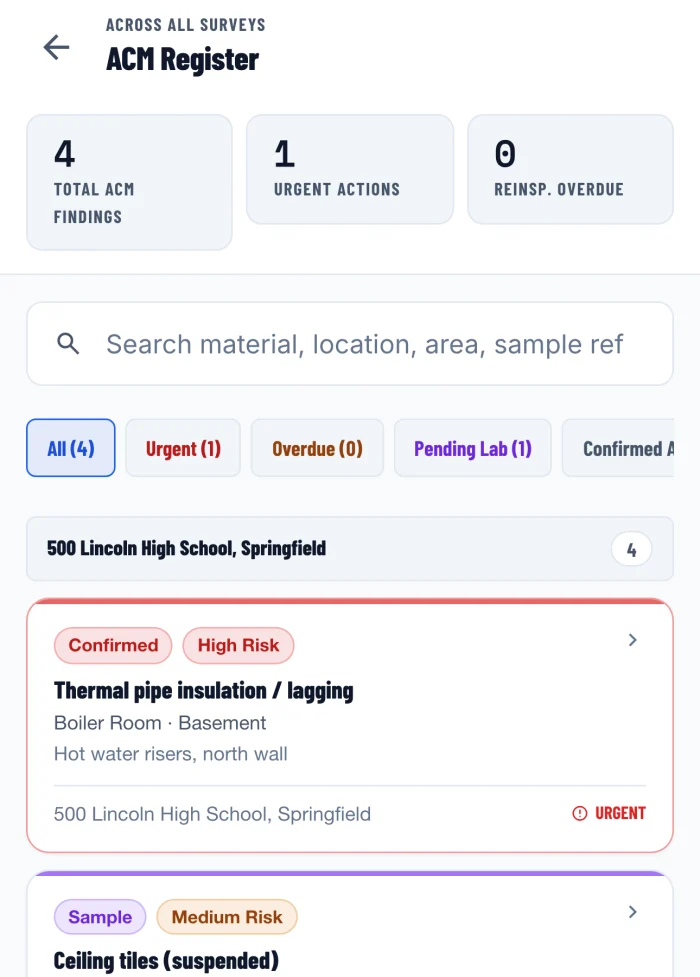
The register holds every material you have recorded, across every survey on the device, filterable by risk band, by urgency, by overdue reinspection and by samples still with the laboratory. It is where you look when somebody asks when that riser was last inspected.
Filters — urgent · overdue · pending lab · confirmed ACM
The cross-survey register is part of the Professional subscription.
04
Deliverable
One PDF, and it is the one you would have written.
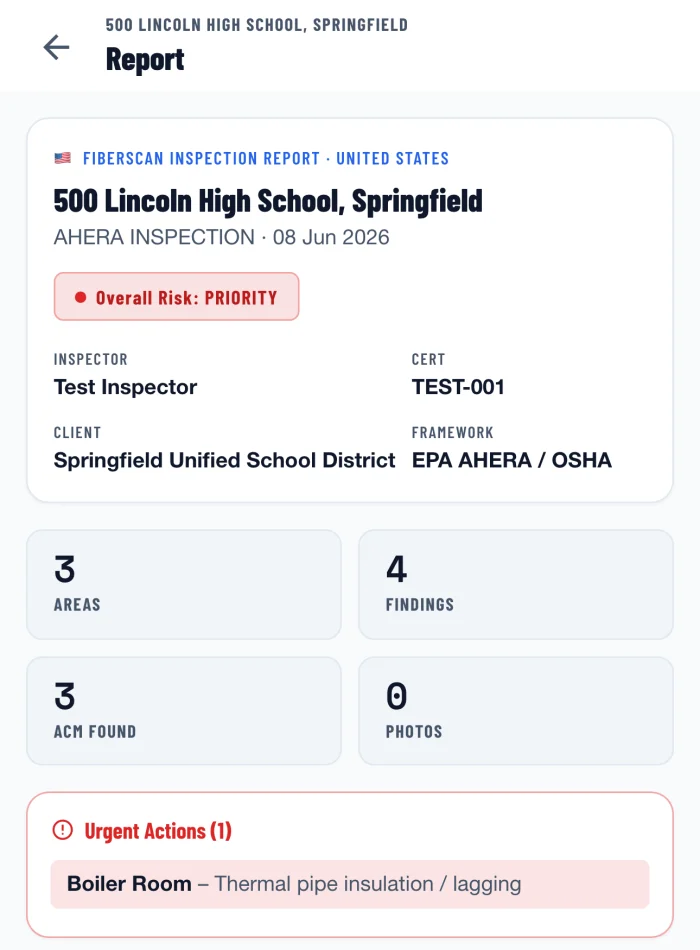
Generated on the device, from the survey as it stands. Your company name, logo and address sit on the cover, above the report reference, the issue date and the revision number — so two copies of the same survey, issued either side of the laboratory results, can be told apart.
- 1Cover & survey particulars
- 2Executive summary
- 3Scope & methodology
- 4Asbestos register — named for your region
- 5Bulk samples
- 6Site floor plan
- 7Photographic record
- 8Surveyor declaration
The declaration prints as a draft block until it is signed, and carries the date it was signed rather than the date of the inspection. Free-tier reports carry a watermark.
05
Regional content
Nine jurisdictions, and a fallback for everywhere else.
Set the region once per survey. The survey types, the terminology, the assessment inputs and the reinspection intervals follow it, and the report prints the framework it was produced under.
Our reference content is researched and cited against primary sources for the United Kingdom (CAR 2012, L143, HSG264, HSG248) and United States federal law (OSHA 1910.1001 and 1926.1101, EPA AHERA, EPA NESHAP). The other regions carry content we have not verified to that standard, and the app marks it as unverified where it appears. Confirm anything you rely on against the primary source or your own regulator.
FiberScan is not accredited, approved or endorsed by HSE, the EPA, OSHA, UKAS, NVLAP, NATA, BOHS or Safe Work Australia; naming a framework describes the content the app carries, not an approval of the app.
06
Offline & sync
The whole survey works in aeroplane mode.
Every capture screen, every assessment and the PDF itself are produced on the device. Cloud backup exists so your surveys survive a lost phone and open on your second one — not to make the app work.
| Works offline | Needs a connection |
|---|---|
| Every capture screen — areas, findings, photographs | Cloud backup and restore |
| On-image annotation | Sync to your other devices |
| Floor-plan sketching and risk pins | Buying or restoring a subscription |
| AR and manual measurement | Nothing else. The app has no other network dependency. |
| Regional assessment inputs and scoring | |
| Reference library | |
| PDF generation, in full |
- Storage — on device, by default
- Cloud — opt-in, Professional only
- Account — one signed-in user
No account is needed to survey, and nothing leaves the device until you sign in with a Professional subscription. What is stored, where, and for how long is set out in the privacy policy.
07
Pricing
Free to survey. Paid to keep.
Every capture feature is in the free tier, on your first survey, without a demo or a sales call. What you pay for is volume, the register, and getting your work off the phone.
Free
$0 forever
- Full offline capture — areas, findings, photographs, annotation, measurement, floor plans, samples
- Regional assessment inputs and scoring
- Reference library
- Full PDF report, watermarked
- One survey at a time
- On-device storage only
No account required.
Professional
$14.99 per month, or $119.99 per year
- Everything in Free
- Unlimited surveys
- Reports without a watermark
- Cross-survey ACM register
- Cloud backup and sync across your devices
- Import and merge surveys from your other devices
- Reinspection reminders
Prices in USD. Billing is handled by the App Store or Google Play, which set local pricing and tax. Cancel in your store account.
Start on the free tier and upgrade in the app when you need to. Questions about volume or multiple seats: [email protected].
08
Scope of the tool
It records what you decide. It does not decide.
FiberScan is a data-capture and reporting tool that supports the professional judgement of a qualified surveyor or inspector. It does not identify asbestos. It cannot determine whether a material contains asbestos, and it does not replace laboratory analysis of a bulk sample by an accredited laboratory.
Every assessment, classification and recommendation in a generated report is the one the user recorded, and the user is responsible for it. The app applies published assessment schemes to the inputs you provide; where a value it prints is an app convention rather than a figure defined by a published scheme, the report says so.
What it is not
- — A laboratory
- — An accreditation, a certification or a licence
- — A substitute for training, or for a competent person
- — A legal opinion on your duties
- — A live database shared with a regulator
- — A survey that anyone else has signed
FiberScan is not accredited, approved or endorsed by HSE, the EPA, OSHA, UKAS, NVLAP, NATA, BOHS or Safe Work Australia. Full conditions of use are in the terms of use.